
The task page
#/tasks/<task> is where one change moves from idea to pull request. Everything on it is read from the task folder — .maverick/tasks/<task>/ by default — and every button runs a maverick command on that task.
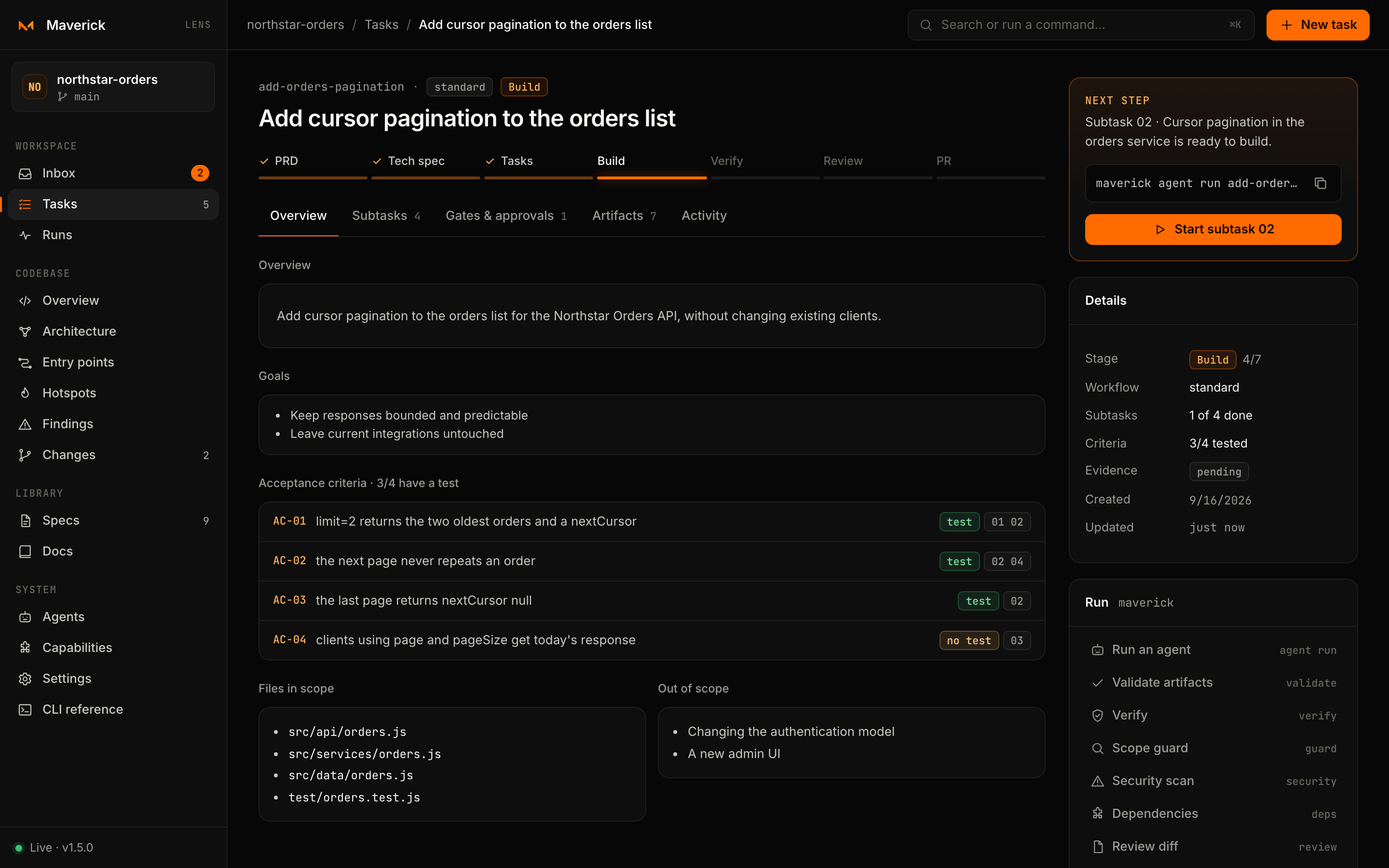
Anatomy
| Part | Shows |
|---|---|
| Header | The task id, its workflow and either its stage or the reason it needs you, then the title. |
| Stage stepper | The stages of the workflow, with completed stages checked and the current one highlighted. A standard task goes PRD → Tech spec → Tasks → Build → Verify → Review → PR → Done; spec-driven adds Spec; strict adds Security. |
| Tabs | Overview, Subtasks, Gates & approvals, Artifacts, Activity — with counts. Each tab has its own address, such as #/tasks/<task>/gates. |
| Next step | One recommendation, the command behind it and a button that does it. |
| Details | Stage (n of m), workflow, subtasks done, acceptance criteria with a test, evidence captured or pending, the pull request once it is open, who finished the task and when, created and updated dates. |
| Run | Every task command Lens may run, one click each. |
Next step
The rail always proposes exactly one thing to do, chosen from the stage:
| Stage | Suggestion | Command | Button |
|---|---|---|---|
| PRD, Spec, Tech spec, Tasks | Write the next planning artifact with your agent | maverick instructions <task> <stage> | Copy stage instructions |
| Build, with a ready subtask | Build that subtask | maverick agent run <task> --subtask <id> | Start subtask id |
| Build, nothing ready | See what blocks progress | maverick subtask next <task> | Open subtasks |
| Verify | Run lint, typecheck, tests and build and record the evidence | maverick verify <task> | Run verify |
| Security | Run the security gate on the diff | maverick security <task> | Run security scan |
| Review | Run the ship flow, review and decide | maverick flow run ship <task> | Open gates |
| PR | Draft, approve and open the pull request | maverick flow run pr <task> | Open pull request |
| PR, draft awaiting approval | Read PR-DRAFT.md and approve opening it | maverick flow approve pr <task> approval | Review and approve |
| PR, pull request open | Finish the task once it merges | maverick done <task> | Finish task, with a link to the pull request |
| Done | Nothing; reopen it to work on it again | maverick reopen <task> | Reopen task |
Planning stages copy instructions instead of running anything, because the PRD and specs are written by the agent you work with, in your editor or terminal. Paste them into Claude Code, Codex, Cursor or any agent, or run the planning stage headlessly with Run an agent.
Overview
- Overview and Goals come from the PRD.
- Acceptance criteria lists every
AC-…item from the PRD with coverage tags: test or no test (is the id named in the Test Plan ofTECHSPEC.md?), spec (for spec-driven tasks: is it covered bySPEC.md?) and the subtasks that reference it. The heading counts how many have a test. - Files in scope comes from the File References and Impact sections of
TECHSPEC.md; Out of scope from the PRD's Non-Goals.
Empty sections say which document will fill them.
Subtasks
Available once the Tasks stage has written subtasks/.
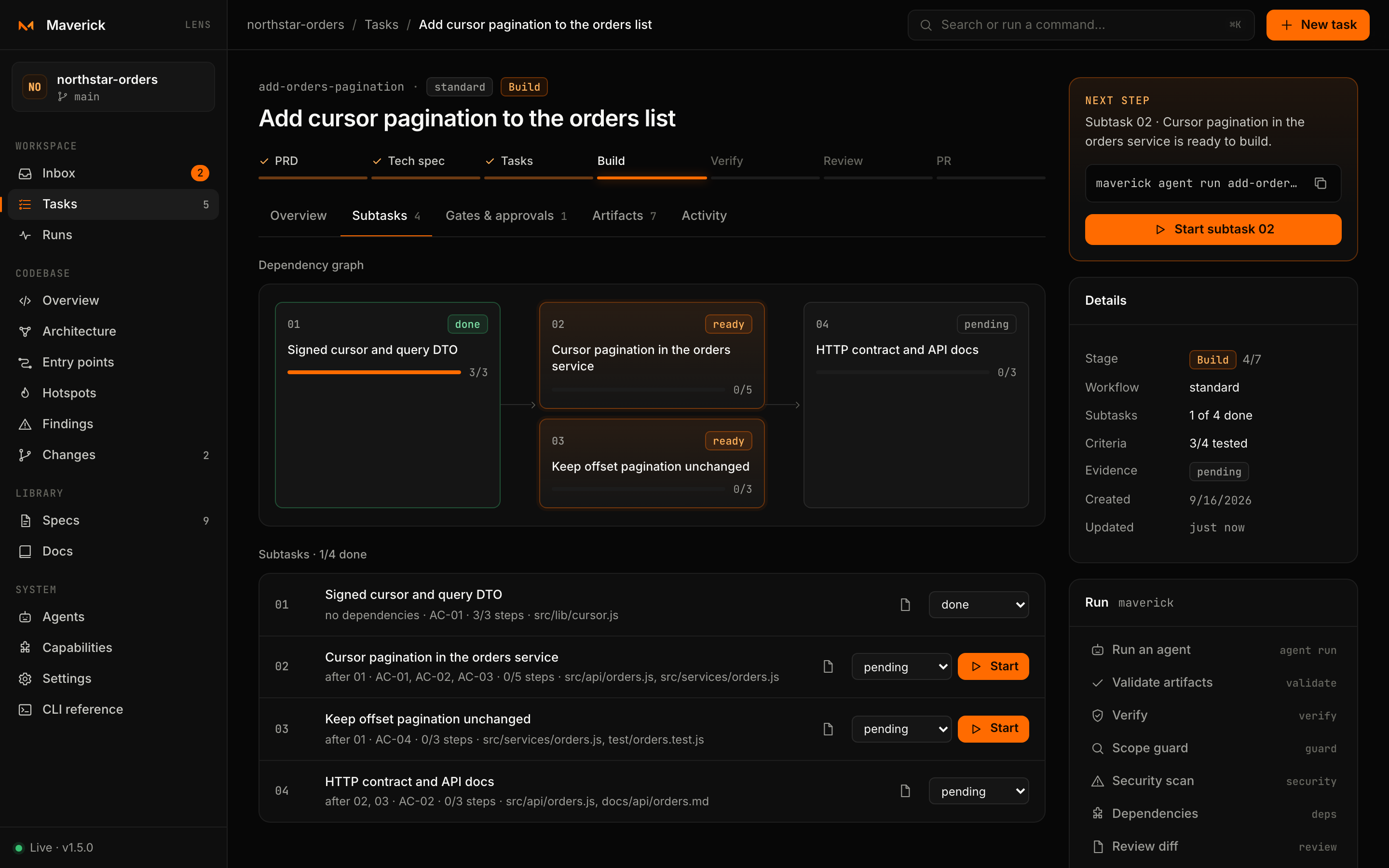
Dependency graph. Subtasks are laid out in columns by dependency depth, so everything in one column can be built in parallel. Each node shows its id, status — ready, pending, in-progress, blocked, done — its title and checklist progress.
List. Each row shows what it waits on (after 01, 02), the acceptance criteria it covers, checklist steps done and the first files it touches. Per row you can:
- read the subtask file;
- change its status (
pending,in-progress,blocked,done) — Lens runsmaverick subtask set <task> <id> <status>; - press Start when it is ready, to run an agent on it.
Problems. When the graph is invalid — a dependency on a missing subtask, a cycle, a malformed file — a banner lists every problem and the task shows up in the Inbox as needing you.
Finishing a subtask with open items
The checklist in a subtask file is its progress record. If you set a subtask to done while items are still unchecked, the CLI refuses, and Lens shows the open items with three ways out:
| Choice | What happens |
|---|---|
| Verify with agent | Starts an agent with an instruction to check each open item against the code and the verification commands, tick the ones that hold and report the ones that do not — without redoing the work. |
| Mark done anyway | Runs maverick subtask set <task> <id> done --force after your own review. The items stay unchecked. |
| Cancel | Leaves the status as it was. |
Gates & approvals
A flow is a contract of gates evaluated together; see The workflow. This tab lists every flow the task uses: ship always, spec for spec-driven tasks, and any other flow that has already run on it. Pick one with the switcher at the top, or link to it with ?flow=<name>.
For the selected flow Lens shows:
- its status — Passing, Needs fixes, Awaiting approval, Stalled, Out of iterations or Not run — the iteration against the cap (
iteration 2/3) and a strip of the last ten outcomes; - the contract goal;
- every gate with its type (the Maverick command it runs, or approval), warn only when it cannot block, its last result and the issues it reported. Approval gates show who decided, when, and the note.
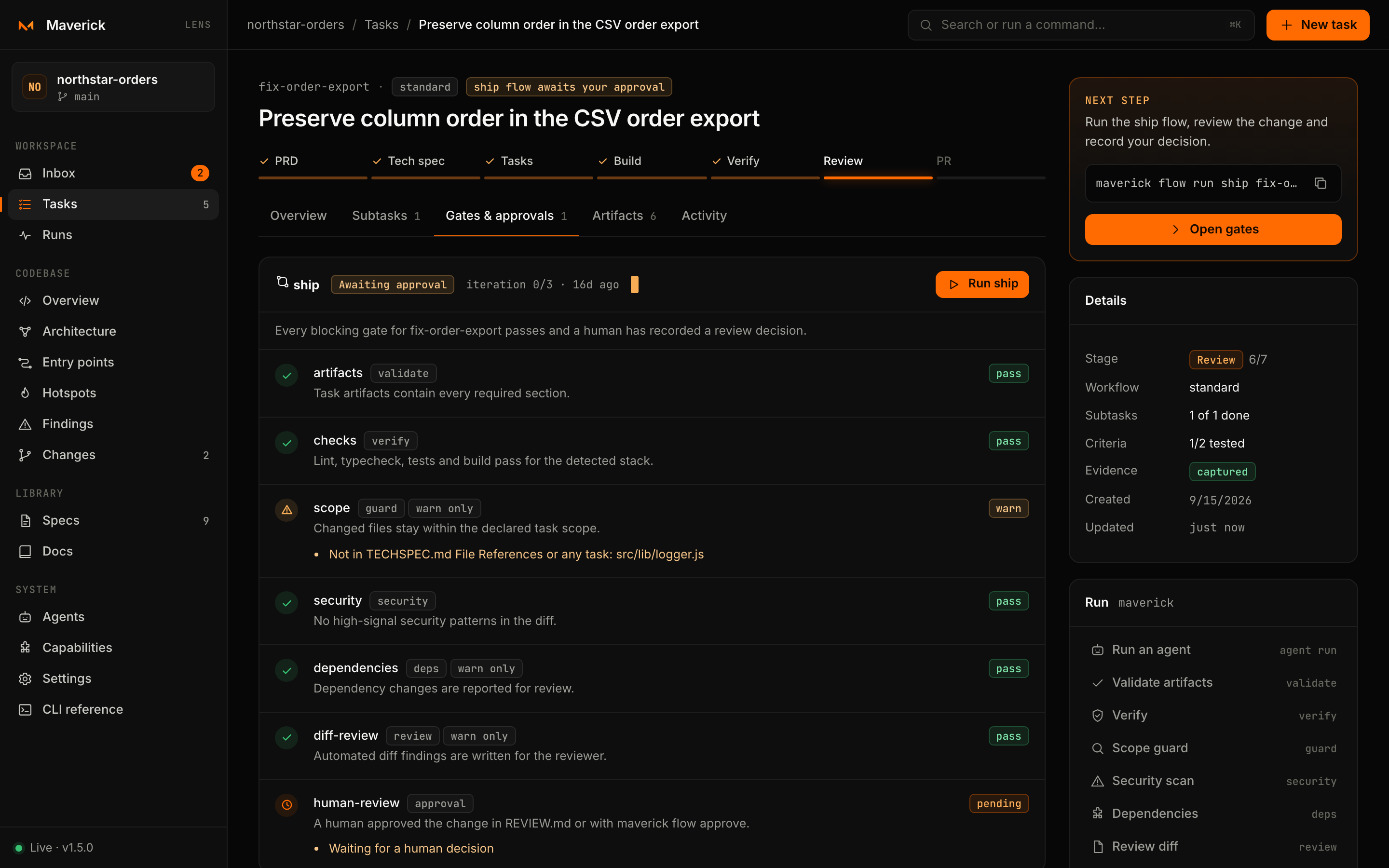
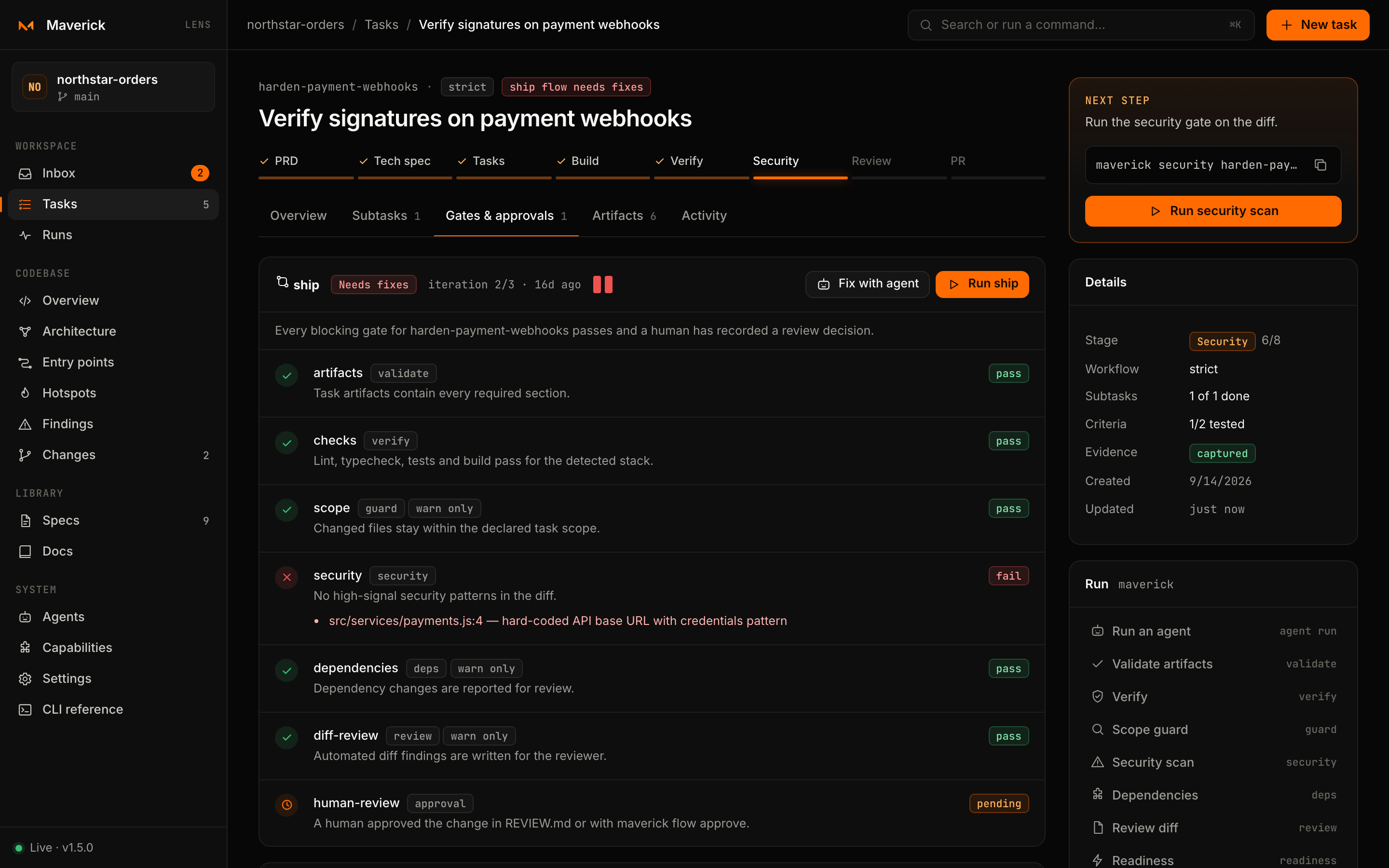
The default ship flow runs these gates:
| Gate | Runs | Blocks |
|---|---|---|
artifacts | maverick validate | yes |
checks | maverick verify | yes |
scope | maverick guard | warn only |
security | maverick security | yes |
dependencies | maverick deps | warn only |
diff-review | maverick review --diff | warn only |
human-review | approval | yes |
Running a flow
Run flow runs maverick flow run <flow> <task> and opens the output panel with one line per gate (✓, ✗, ⚠), the outcome and what to do next. When the flow has stalled (no progress across the no-progress window) or used every iteration, the button becomes Reset and run, which adds --reset.
When blocking gates failed, Fix with agent starts a fix run that receives exactly those issues.
Recording a decision
When an approval gate is pending, the Record your decision form appears. While the flow is awaiting approval it sits above the gates, since it is the next step:
- Choose the gate, if more than one is pending.
- Fill Reviewed by. Lens remembers the name in this browser.
- Add a Note: what you checked and what to follow up. A note is required to request changes.
- Press Approve or Request changes.
The decision is recorded the way maverick flow approve records it: in the flow state (flows/<flow>.json) and in the gate's file, so an approval of human-review checks - [x] approve in REVIEW.md and the task moves on to the PR stage. When every blocking check of the last run already passed, the flow is decided at once (Passing after an approval, Needs fixes after a change request); otherwise run the flow again.
Opening the pull request
At the PR stage the task offers the pr flow next to ship. Open pull request runs it: it checks the review decision and merge readiness, writes PR-DRAFT.md (or keeps the one you edited), and stops at its approval gate. Read the draft on the Artifacts tab (its heading is the pull request's title), then approve it with the Record your decision form. Approving runs the open gate at once: Maverick finds the provider from the origin remote (GitHub, GitLab, Azure DevOps or Bitbucket), moves the change off the base branch if needed, commits it, pushes the branch and opens the pull request with gh, glab or az. The gate links to the pull request, and Details shows it. Without the provider's CLI the branch is pushed and the gate links to the provider's page for creating it. The open gate shows waiting until every blocking gate before it passed, so nothing is pushed before the approval.
Finishing a task
Finish task (in Next step once the pull request is open, and in the Run card at any stage) asks who finished it and an optional note, then runs maverick done <task>. The task moves to Done: it leaves the Inbox and sits in the Done lane of the board. Before the PR stage the dialog says which gates were skipped and finishes with --force. Reopen task runs maverick reopen <task>.
Auto-approve
The Auto-approve switch next to Run flow turns auto-approval on or off for that flow in every task, through maverick flow auto-approve <flow> on|off (Lens asks before turning it on). With it on, a run whose blocking checks all pass approves its pending approval gates instead of waiting for you; for the pr flow that means the pull request is opened in the same run. The gate shows auto-approved, and the checked box in the gate's file is followed by a note that no human recorded the decision. A run with a failing blocking check is never auto-approved.
Artifacts
Every Markdown file of the task, grouped as Plan (PRD.md, SPEC.md, TECHSPEC.md, TASK.md), Review (REVIEW.md), Reports (evidence, findings, scope, security, dependency and readiness reports) and Subtasks. The reader renders Markdown safely — the text is escaped before formatting, so no HTML from a file reaches the page — and offers Copy path. Link to a file with ?file=<name>.
Activity
A timeline of the last 40 events: flow runs and their outcomes, approvals and change requests with their notes, updates to plan, review and subtask files, the pull request and the task's completion, newest first.
The Run card
| Button | Command |
|---|---|
| Run an agent | Opens the run dialog for the whole task |
| Validate artifacts | maverick validate <task> |
| Verify | maverick verify <task> |
| Scope guard | maverick guard <task> |
| Security scan | maverick security <task> |
| Dependencies | maverick deps <task> |
| Review diff | maverick review <task> --diff |
| Readiness | maverick readiness <task> |
| Checkpoint | maverick checkpoint <task> |
| Draft pull request | maverick pr <task> |
| Open pull request | maverick flow run pr <task> |
| Finish task / Reopen task | maverick done <task> / maverick reopen <task> |
Each opens the output panel and refreshes the task when it finishes. These, the subtask status change and the flow run are the only task commands the server accepts; anything else is refused. See the HTTP API.