
Agents
Lens can start headless coding agents — Claude Code, Codex, Cursor, Gemini CLI, Antigravity, GitHub Copilot CLI, Kiro, OpenCode or your own command — to write planning artifacts, build subtasks and fix failing gates. It uses the same runtime as maverick agent run, with the same trust list, permission ceiling and transcripts. System → Agents (#/agents) is where you control all of it.
Agents run as you
A trusted agent runs on your machine with your user account, inside this repository. Trust a provider only after you have reviewed what it can do, and keep the maximum permission as low as your work allows.
The trust model
Three rules decide whether a run can start. Lens and the CLI enforce them in the same code, before anything is written.
- Only trusted providers run. Trust is per repository and lives in
runtime.trustedin.maverick/config.json, so it shows up in code review like any other change. - The configuration is the ceiling.
runtime.maxPermission(defaultedit) caps every run. A run can ask for less, never for more. - Providers declare what they support. Some CLIs cannot honour a level exactly — Cursor CLI applies edits only together with shell access, and OpenCode may approve shell commands on its own — so Lens does not offer that level for them.
Permission levels
| Level | The agent may |
|---|---|
read-only | Read and search the repository. Used for reviews and questions. |
edit | Read and edit files in the working tree. The default ceiling. |
full | Edit files and run shell commands. |
Each provider translates the level into its own flags. Levels shown in amber in the Providers table are above the current ceiling.
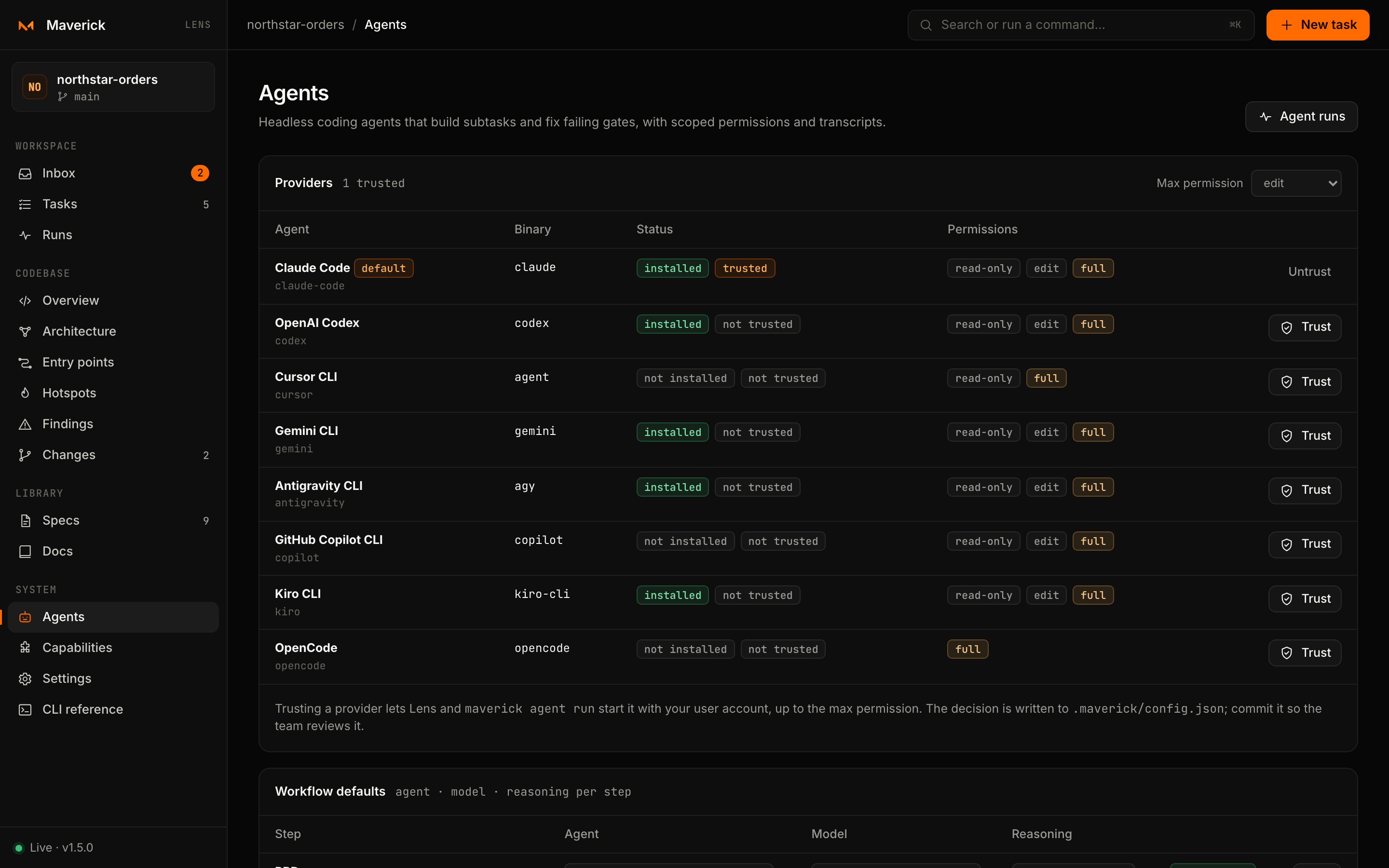
Providers
The Providers table lists every built-in and custom provider with:
- Binary — the executable Lens will start, such as
claude,codex,agent,gemini,agy,copilot,kiro-clioropencode. Override it withruntime.bins. - Status — installed or not installed on this machine, and trusted or not trusted in this repository.
- Permissions — the levels the provider supports.
- Trust / Untrust.
Trust asks for confirmation, naming the binary, then runs:
maverick agent trust <provider> --yesUntrust runs maverick agent untrust <provider> --yes.
Max permission in the table header changes the ceiling for the repository: Lens runs maverick agent trust <provider> --max-permission <level> --yes on a trusted provider, which writes runtime.maxPermission.
Workflow defaults
Each step of the workflow can use a different agent, model and reasoning effort. The Workflow defaults table has one row per step:
| Step | What a run of this step does |
|---|---|
| PRD | Writes PRD.md: the problem, goals and acceptance criteria |
| Spec | Writes SPEC.md, the behavioral contract (spec-driven workflow) |
| Tech spec | Writes TECHSPEC.md: design, file references, risks and commands |
| Tasks | Breaks the tech spec into the subtask graph |
| Build | Implements a subtask or the whole task |
| Fix | Fixes the blocking issues of a failed flow |
For each row pick the Agent, the Model — listed by the provider's CLI where it can list them, with Custom model… for any other id — and the Reasoning effort the provider accepts. Save runs maverick agent stage <step> --provider … --model … --effort … and writes runtime.stages.<step>; Reset (--reset) goes back to the recommendation. A row says recommended when it matches Maverick's recommendation.
The recommendation follows one rule: planning artifacts are short and decide everything downstream, so they get the strongest model with high reasoning; building is long and tool-heavy, so it gets the provider's coding workhorse at high effort; fixing named failures is narrow, so it uses the workhorse at a lower effort. The very top effort levels are never a default.
| Provider | PRD · Spec · Tech spec | Tasks | Build | Fix |
|---|---|---|---|---|
| Claude Code | opus · xhigh | opus · high | sonnet · xhigh | sonnet · high |
| Codex | gpt-6-astra · high | gpt-6-astra · medium | gpt-6-sol · high | gpt-6-sol · medium |
| Antigravity | gemini-3.1-pro-high | gemini-3.1-pro-high | gemini-3.8-flash-high | gemini-3.8-flash-medium |
| Gemini CLI | pro | pro | pro | flash |
| Kiro | claude-opus-5 · xhigh | claude-opus-5 · high | claude-sonnet-5 · xhigh | claude-sonnet-5 · high |
Other providers use their own default model unless you choose one.
Starting a run
You can start an agent from:
| Where | Kind of run |
|---|---|
| Start on a ready subtask, or the Inbox's Start agent | Build that subtask |
| Run an agent on the task page | Work on the whole task, criterion by criterion (a Build run) |
| Fix with agent on a failed flow | Fix the blocking issues of the last run |
| Verify with agent when finishing a subtask with open items | Check the open checklist items without redoing the work |
If no provider is both trusted and installed, Lens explains why and offers to open Agents.
The run dialog
| Field | Default |
|---|---|
| Agent | Trusted, installed providers only; the step's default first |
| Model | The step's default or the recommendation — the hint says which |
| Reasoning | The step's default or the recommendation, if the provider has reasoning levels |
| Permission | edit when the ceiling allows it; only levels the provider supports and the ceiling allows are listed |
| Instruction | Optional extra guidance, appended to the prompt Maverick builds |
Press Start agent. Lens resolves the run first, so an untrusted provider or a permission above the ceiling fails before anything changes. A pending subtask moves to in-progress; then the agent starts headless in the repository and Lens opens its live view in Runs.
Only one agent can run on a task at a time. Agents on different tasks can run side by side.
What the agent receives
Maverick builds the prompt from the task folder: the repository's verification commands (or, at read-only and edit, a note on what the agent may run), the task's planning files, the current subtask with its checklist — which the agent ticks as it goes — the blocking issues for a fix run, and the instruction: yours, or Implement subtask n / Implement the task criterion by criterion. The equivalent CLI command is shown in the task's next step — for example:
maverick agent run add-orders-pagination --subtask 02 --provider claude-code --permission editFixing failed gates
Fix with agent collects every blocking gate that failed in the flow's last run, with each issue as <gate>: <issue>, and passes them to the run as its scope. The run uses the Fix step's defaults. When it finishes, run the flow again to see whether the gates pass.
While and after it runs
Events stream live to the run view: the provider, model and permission, each tool call, the agent's messages, errors and the final result. Stop aborts the process. When the run ends, Lens shows:
- the outcome and duration;
- the agent's summary, the files it changed and any questions it left for you;
- cost, when the provider reports it;
- problems and warnings found by Maverick's checks;
- the transcript path,
.maverick/tasks/<task>/runs/<timestamp>-<provider>.jsonl.
The task and the index refresh automatically. Hooks configured for before-agent-run (which can block the run) and after-agent-run fire exactly as they do from the CLI.
Role instructions
Role instructions shows the agent role files of the repository (agents/*.md — builder, reviewer, test engineer, security, debugger, architect), so you can read the brief each role follows. Install these roles into your AI tools from Capabilities.
Configuration
Everything on this page is stored under runtime in .maverick/config.json:
{
  "runtime": {
    "trusted": ["claude-code", "codex"],
    "maxPermission": "edit",
    "default": { "provider": "claude-code" },
    "stages": {
      "build": { "provider": "codex", "model": "gpt-6-sol", "effort": "high" }
    },
    "routes": [
      { "match": { "complexity": "high" }, "provider": "claude-code", "model": "opus" }
    ],
    "timeoutMinutes": 30
  }
}
See Configuration for every key and how a run resolves its provider, model and permission.