
Your first task
TUTORIAL · 10 MINUTES
This walkthrough takes one change, adding pagination to an orders endpoint, from an idea to review-ready evidence. Run it in any repository.
Initialize the project
bashmaverick initMaverick detects your stack, asks two languages and writes
.maverick/config.json: the docs language for everything the flow writes and asks (defaulting to yourLANG, sopt_BR.UTF-8suggestspt-BR) and the code language for identifiers, comments, tests and commit messages (defaulten). It then installs the ten flow skills into every AI coding agent on your machine. The default workflow isstandard.bashmaverick init --docs-language pt-BR --code-language en --agents claude-code,codexOutside a terminal both languages default to
en;--no-skillsskips the skills. Change the languages later withmaverick language.Start from the idea
bashmaverick new "Add cursor pagination to the orders endpoint"Maverick derives the slug
add-cursor-pagination-orders-endpoint(choose another with--slug), writesTASK.jsonand grounds the idea in your code: the files the change most likely touches, ranked with a reason for each, the tests next to them, the entry points and the real verification commands.In a terminal, it then opens your AI coding agent (Claude Code, Codex, Cursor or Gemini, whichever is installed) with the flow skills installed, starting with the maverick-new skill. From here on everything happens inside the agent. Already inside one? Ask it to use the maverick-new skill; in Claude Code, type
/maverick-new Add cursor pagination to the orders endpoint.Write the PRD
The agent reads the grounded files, then asks only what the code cannot answer, one question at a time, with a recommendation and A/B/C/D-Other options. It writes
PRD.mdin full: goals, user stories, requirements with scenarios, and acceptance criteria.md## Acceptance Criteria - [ ] AC-01: Given 3 orders, when a client requests limit=2, then it receives 2 orders and a nextCursor. (US-01) - [ ] AC-02: Given an invalid cursor, when a client requests a page, then it receives 400 invalid_cursor. (US-01)It validates the PRD and asks before moving on.
Write the technical spec
TECHSPEC.mddescribes the current code withpath:linereferences, the chosen approach and the rejected alternatives, the real files to change, and a Test Plan that maps every test to a criterion (UT-01 → AC-01).Break it into tasks
The agent writes
subtasks/_tasks.mdand onetask_NN.mdper task, each with its files, steps, tests and verification. Every acceptance criterion is covered by a task.bashmaverick validate add-cursor-pagination-orders-endpoint --strictNo interactive agent? Run the same stages headlessly:
maverick generate add-cursor-pagination-orders-endpoint --agent claude-code. See From idea to tasks.Build with maverick-build
When the tasks are written, the agent asks before moving on. Say yes, or invoke the maverick-build skill. It takes the ready tasks one at a time, in dependency order: marks the task in progress, works through its checklist of steps, tests and criteria, checking each item in the task file as it is done, runs
maverick verify, marks it done (which Maverick refuses while an item is unchecked), and asks before starting the next.verifyrecords the exit codes of the detected test, lint, type-check and build commands as evidence.Review with maverick-review
The maverick-review skill runs
verify,guard,security,depsandreview --diff, then reviews the diff against each PRDAC-NNand fillsREVIEW.md. It leaves the decision to you: read the diff with the evidence beside it and tick approve, approve with follow-up or request changes. Maverick reports readiness; it never approves a change on its own.Ship with maverick-ship
The maverick-ship skill runs
readinessandpr, which writesPR-DRAFT.md. It commits, pushes or opens the PR only when you explicitly ask, and never merges.The same gates from the CLI
Every skill calls ordinary CLI commands, so you can run them yourself:
bashmaverick subtask next add-cursor-pagination-orders-endpoint maverick verify add-cursor-pagination-orders-endpoint maverick guard add-cursor-pagination-orders-endpoint maverick review add-cursor-pagination-orders-endpoint --diff maverick readiness add-cursor-pagination-orders-endpoint maverick pr add-cursor-pagination-orders-endpoint
See it in Lens
maverick lens --open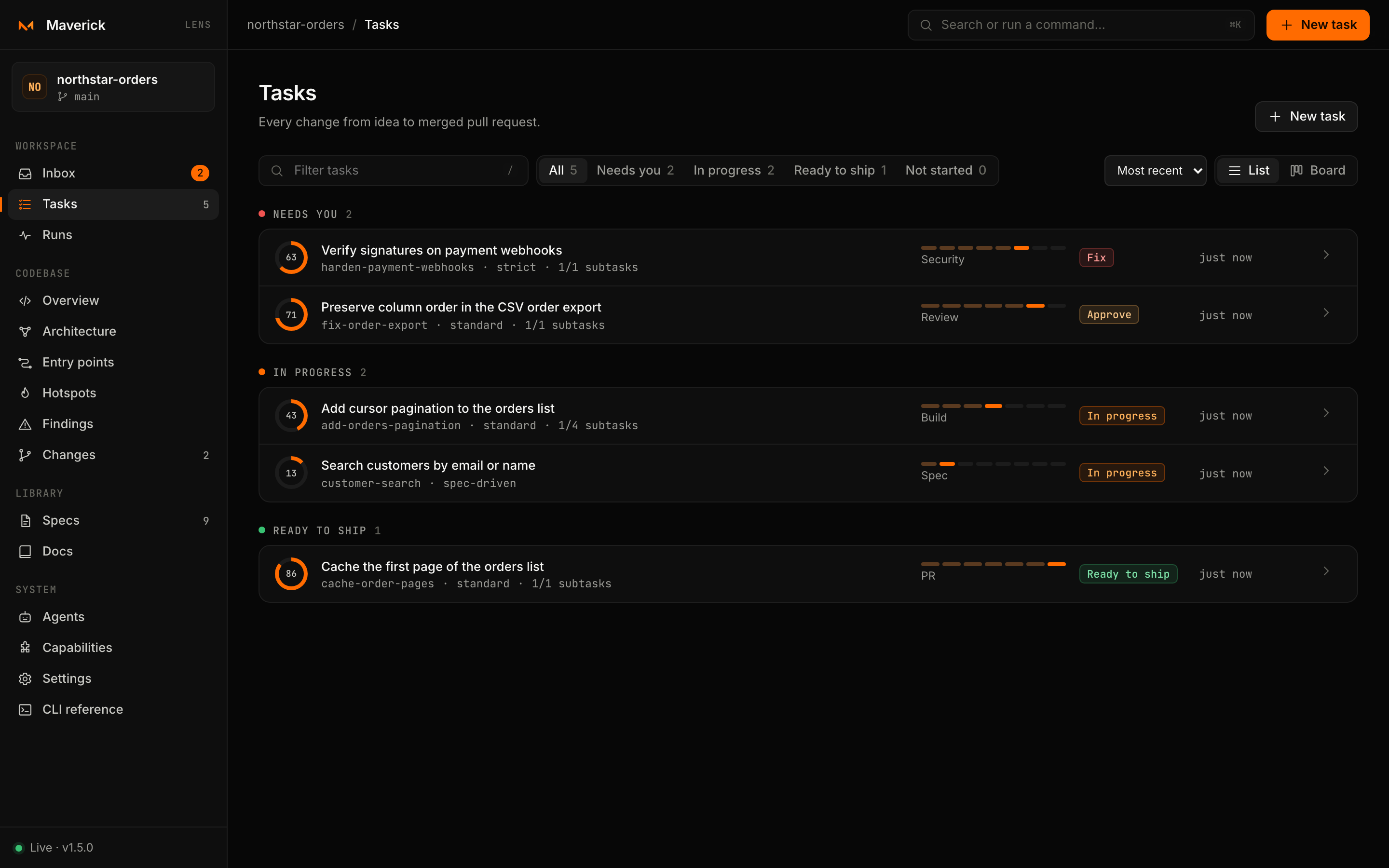
From there you can follow the task's next step, start an agent on a ready subtask and record your review decision without leaving the browser. See The task page.
Where am I?
maverick status shows each task's stage and the skill to run next. maverick new <slug> (or maverick open <slug>) reopens the agent with that skill.